A NEW CHAPTER FOR SCHOOL OPERATIONS

A little less admin.
A little more
possibility.

Know what a break means for coverage before it starts. Welcome families without retyping the roster. Help every teacher learn your school’s way. SchoolDesk connects the details that make a school day work.

In development. Explore a fictional preview—no sign-in needed.

A GOOD DAY STARTS HERE

Small moments.
All connected.

✓
A warm welcomeArrivals and family connections
Aa
Room for discoveryHands-on classroom plans
♡
A supported teamTime, training, and shared routines
More together. Less scattered.
Designed around early educationOne connected school workspaceOriginal, from the ground up

BUILT AROUND THE MOMENTS THAT MATTER

More than a place
to enter information.
A way to act on it.

Choose a workspace that helps you see the next step. These are the practical strengths we’re building into SchoolDesk—and already testing in the prototype.

New in the prototype

See the coverage impact
before a teacher steps away.

A teacher’s break or lunch preview shows supervising staff now, the projected count afterward, and any gap under your recorded planning rule. Changed attendance or staffing? The preview must be reviewed again.

Try the coverage preview →A planning aid based on recorded information. Your school still confirms actual coverage and applicable requirements.
YOUR SCHOOL’S WAY

Turn onboarding into a shared routine.

Create your own lessons, assign them to staff, set due dates, and have another authorized supervisor sign off. Your procedures and the team’s progress live in the same workspace.

A MORE CAREFUL MOVE

Preview the move before making it.

Match roster columns and classrooms, keep siblings together, and catch repeated student IDs. An invalid import adds no rows, so you can fix the file before starting again.

ROOM FOR YOUR AI

Keep choice in your AI workflow.

Prepare school task prompts for the assistant you choose. Review and copy the prompt yourself, keeping you in charge of what leaves your workspace.

Prompt preparation is available. Direct AI connections are not yet enabled.

FEWER LOOSE ENDS. MORE FOLLOW-THROUGH.

Useful on their own.
Better connected.

Move everyday work beyond separate notes, worksheets, and repeated data entry.

The everyday taskThe SchoolDesk approach
Preparing the next tuition cycleRun scheduled charges without duplicating them. Monthly and weekly plans keep their next due date, even when a run is repeated.
Moving an accepted application into the rosterCarry the saved details forward. Reviewed enrollment creates the child record and family account together.
Knowing whether a returning teacher is covering a roomSeparate availability from supervision. Ending a break makes the teacher available; a manager confirms recorded classroom supervision.
Deciding whether the workflow fits your schoolTry it before sharing your details. This public demo needs no account and uses only fictional, temporary data.

THE DAY, A LITTLE CLEARER

All the moving parts.
A place for each one.

Explore the workflows taking shape in the SchoolDesk prototype.

01

Keep tuition in view

Follow balances, prepare recurring charges, and organize follow-up. Give families a clearer view of what’s owed.

Payment collection is a future connection.
02

Bring families closer

A family portal with school conversations, a calendar, tuition details, and recorded attendance.

Local inbox today; external notifications to come.
03

Support the people doing the work

Personal time controls, shift planning, original training lessons, and supervisor sign-off in one place.

Payroll remains a separate review.
04

Make space for learning

Plan hands-on letters, colors, and counting. Open simple classroom activities on a browser-connected smartboard.

School-led planning and teacher review.
05

Know who’s here

Record arrivals, pickups, and room changes. See how recorded attendance and staff availability affect planning.

People still verify supervision and pickup authority.
06

Welcome the next family

Keep applications, tours, and waitlists organized, then move a reviewed application into your roster.

Admission documents and signatures are still ahead.

ONE SCHOOL. DIFFERENT RESPONSIBILITIES.

The right workspace.
For each person.

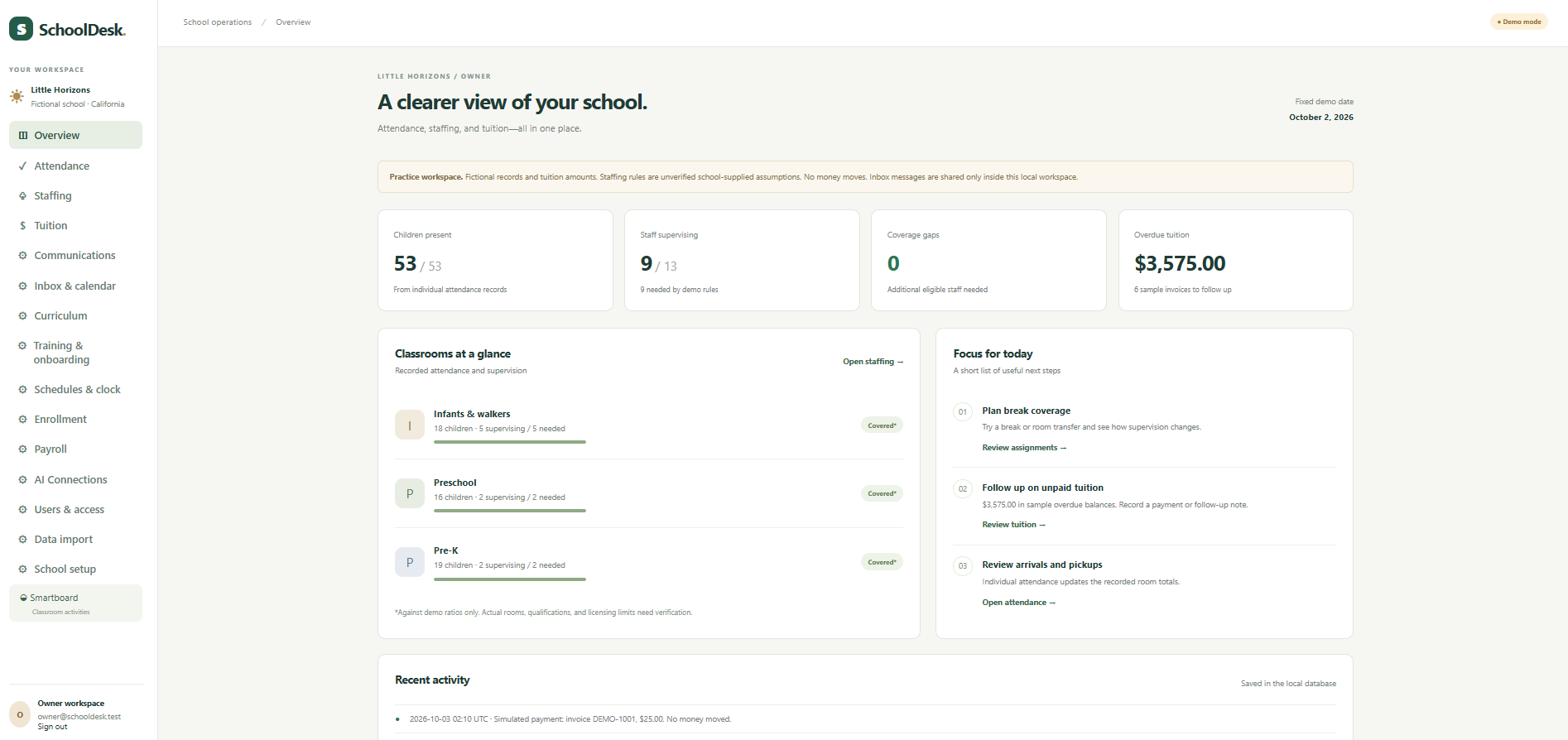
See actual screens from the working prototype. Choose a role to explore its dashboard and permissions. All pictured accounts and school records are fictional.

OWNER WORKSPACE

The schoolwide picture, with full oversight.

Review attendance, staffing and tuition together. Manage every account role and control school planning settings, backups and the AI prompt workspace.

What this role can do
  • Manage school operations, billing and payroll preparation
  • Manage all user roles, including other owners
  • Access school setup, backups and AI prompt preparation
Owner dashboard showing schoolwide attendance, staff coverage and demo tuition balances
Owner · actual prototype school overviewClick the image to enlarge ↗
Compare the four roles side by side

These are the current prototype permissions. Owner and Administrator share the overview layout; their management permissions differ.

Current SchoolDesk prototype access
FeatureOwnerAdministratorTeacherParent
School overview, staffing and enrollmentSchoolwideSchoolwideNoNo
TuitionAll familiesAll familiesNoOwn family only
Payroll preparationYesYesNoNo
Clock and break recordsOffice controls for staffOffice controls for staffOwn linked staff recordNo
Curriculum and smartboardShared school toolsShared school toolsShared school toolsSample learning updates only
TrainingCreate, assign and reviewCreate, assign and review within role hierarchyOwn assignments onlyNo
User managementAll rolesManagers, teachers and parentsNoNo
Roster importYesYesNoNo
School setup, backups and AI promptsYesNoNoNo
Family attendance and inboxSchoolwideSchoolwideNo classroom access yetOwn family only

GO AHEAD. TRY A FEW THINGS.

A small window into
a SchoolDesk day.

Explore three sample views. Every name and number is fictional. Changes stay in this page and reset when you refresh.

sLittle HorizonsFictional school

Interactive illustration · no real records, payments, or messages

This is a small, isolated tour—not a live school account. Staffing numbers illustrate a sample rule, not licensing compliance.

A FAMILIAR START

Your next chapter
shouldn’t begin
with retyping.

The prototype’s roster importer helps schools bring students and families along. Review the file before anything is added.

Student & family CSV import
  1. 01

    Bring your roster

    Start with a CSV file and stable student and family IDs.

  2. 02

    Make the connections

    Match exported columns and classroom names to your school.

  3. 03

    Review, then begin

    Check the preview, resolve duplicates, and confirm the import. Siblings can share a family record.

A FEW GOOD QUESTIONS

Clear from the start.

Can my school use SchoolDesk today?

SchoolDesk is a working local prototype being developed toward a school pilot. This public tour contains fictional data only. Production hosting, separate school accounts, privacy and security review, and service integrations are still needed before real school use.

What will it cost?

The goal is an affordable subscription for small schools, with optional extras. Pricing is not finalized. Payment processing, messaging, and other usage costs will be made clear before any paid launch.

Will it work on our smartboard?

The prototype includes browser-based classroom activities with large controls. Compatibility with your specific board, browser, and touch setup needs to be tested.

Can we import everything from another app?

The first importer handles student and family rosters in CSV format. Tuition balances, staff records, documents, and historical attendance need additional import tools. It does not copy another product’s code or design.

For the people behind
every little discovery.

SchoolDesk is growing, one useful workflow at a time.

Explore the preview →